Si necesitamos sumar dias a una fecha dada en Java, bien sea una fecha tomada actualmente o una fecha que descargamos de la base de la base de datos y deseamos sumarle dias a esa fecha se hace lo siquiente,
"Funciona perfectamente con Date"
Date nuevaFecha = new Date();
Calendar cal = Calendar.getInstance();
cal.setTime(yourDAte);
cal.add(Calendar.DATE, 5);
nuevaFecha = cal.getTime();
si necesitamos sumar meses
Calendar cal = Calendar.getInstance();
cal.setTime(yourDAte);
cal.add(Calendar.MONTH, 5);
nuevaFecha = cal.getTime();
de esta manera estamos sumando 5 Meses mas a la fecha obetenida o por la fecha que esta siendo tomada por el sistema con Date nuevaFecha = new Date(); o por una fecha que esta siendo recuperada de una base de datos y realizandole la operacion de sumarle o los dias o los meses
en donde colocamos yourDAte alli podemos colocar el nombre de la variable Date bien tomada del sistema o tomada de una base de datos, y de esta forma estaremos sumando dias a un fecha dad.
Sunday, November 29, 2015

Sunday, November 22, 2015
Sort ArrayList of custom Objects by property - Ordenar ArrayList por cualquiera de los elementos que lo componen
Aveces debemos de ordenar ArrayList por cualquiera de los elementos internos como por ejemplo, tenemos el siguiente ArrayList de tipo Persona
ArrayList<Persona> people = new ArrayList<>();
people.add(new Persona("Joe", 92422, df.parse("12-12-2010")));
people.add(new Persona("Joef", 24122, df.parse("1-12-2010")));
people.add(new Persona("Joee", 24922, df.parse("12-2-2010")));
y queremos ordenar el Array por orden del Id de mayor a menor, o de menor a mayor, o por fecha de mayor a menor o de menoy a mayor, la solucion es la siguiente:
import java.util.Date;
public class Persona {
public String name;
public int id;
public Date hireDate;
public Persona(String iname, int iid, Date ihireDate) {
name = iname;
id = iid;
hireDate = ihireDate;
}
public String toString() {
return name + " " + id + " " + hireDate.toString();
}
}
//-----------------------------------------------------------------------------------//
import java.text.ParseException;
import java.text.SimpleDateFormat;
import java.util.ArrayList;
import java.util.Collections;
import java.util.Comparator;
public class Principal {
public static void main(String[] args) {
SimpleDateFormat df = new SimpleDateFormat("mm-dd-yyyy");
ArrayList<Persona> people = new ArrayList<>();
try {
people.add(new Persona("Joe", 92422, df.parse("12-12-2010")));
people.add(new Persona("Joef", 24122, df.parse("1-12-2010")));
people.add(new Persona("Joee", 24922, df.parse("12-2-2010")));
} catch (ParseException e) {
// TODO Auto-generated catch block
e.printStackTrace();
}
Collections.sort(people, new CompId());
System.out.println("BY ID");
for (Persona p : people) {
System.out.println(p.toString());
}
System.out.println("//-----------------------------------------//");
Collections.sort(people, new CompDate(false));
System.out.println("BY Date asc");
for (Persona p : people) {
System.out.println(p.toString());
}
Collections.sort(people, new CompDate(true));
System.out.println("BY Date desc");
for (Persona p : people) {
System.out.println(p.toString());
}
}
public static class CompId implements Comparator<Persona> {
@Override
public int compare(Persona arg0, Persona arg1) {
return arg0.id - arg1.id;
}
}
public static class CompDate implements Comparator<Persona> {
private int mod = 1;
public CompDate(boolean desc) {
if (desc) mod =-1;
}
@Override
public int compare(Persona arg0, Persona arg1) {
return mod*arg0.hireDate.compareTo(arg1.hireDate);
}
}
}
De esta manera tenemos nuestro ArrayList organizado por ID y fecha
ArrayList<Persona> people = new ArrayList<>();
people.add(new Persona("Joe", 92422, df.parse("12-12-2010")));
people.add(new Persona("Joef", 24122, df.parse("1-12-2010")));
people.add(new Persona("Joee", 24922, df.parse("12-2-2010")));
y queremos ordenar el Array por orden del Id de mayor a menor, o de menor a mayor, o por fecha de mayor a menor o de menoy a mayor, la solucion es la siguiente:
import java.util.Date;
public class Persona {
public String name;
public int id;
public Date hireDate;
public Persona(String iname, int iid, Date ihireDate) {
name = iname;
id = iid;
hireDate = ihireDate;
}
public String toString() {
return name + " " + id + " " + hireDate.toString();
}
}
//-----------------------------------------------------------------------------------//
import java.text.ParseException;
import java.text.SimpleDateFormat;
import java.util.ArrayList;
import java.util.Collections;
import java.util.Comparator;
public class Principal {
public static void main(String[] args) {
SimpleDateFormat df = new SimpleDateFormat("mm-dd-yyyy");
ArrayList<Persona> people = new ArrayList<>();
try {
people.add(new Persona("Joe", 92422, df.parse("12-12-2010")));
people.add(new Persona("Joef", 24122, df.parse("1-12-2010")));
people.add(new Persona("Joee", 24922, df.parse("12-2-2010")));
} catch (ParseException e) {
// TODO Auto-generated catch block
e.printStackTrace();
}
Collections.sort(people, new CompId());
System.out.println("BY ID");
for (Persona p : people) {
System.out.println(p.toString());
}
System.out.println("//-----------------------------------------//");
Collections.sort(people, new CompDate(false));
System.out.println("BY Date asc");
for (Persona p : people) {
System.out.println(p.toString());
}
Collections.sort(people, new CompDate(true));
System.out.println("BY Date desc");
for (Persona p : people) {
System.out.println(p.toString());
}
}
public static class CompId implements Comparator<Persona> {
@Override
public int compare(Persona arg0, Persona arg1) {
return arg0.id - arg1.id;
}
}
public static class CompDate implements Comparator<Persona> {
private int mod = 1;
public CompDate(boolean desc) {
if (desc) mod =-1;
}
@Override
public int compare(Persona arg0, Persona arg1) {
return mod*arg0.hireDate.compareTo(arg1.hireDate);
}
}
}
De esta manera tenemos nuestro ArrayList organizado por ID y fecha
Tuesday, November 17, 2015
JPA 2 | Understanding relationships between entities
JPA 2 | Understanding relationships between entities
Entities in Object Relational Model are the objects that contain/maintain state for the application. An application can have relationships between its objects. For example, an author can have one or many books to his name. Or an employee can work for one or more projects. We find relationships everywhere. For a relationship, we need two entities that can be related to each other, just like in a marriage. Entities need to have a relationship with other entities to become meaningful.In today's blog, we will look at how entity relationships are defined in JPA 2. The ideas and most of the contents on this blog are inspired from Pro JPA 2 : Mastering the Java Persistence API .
A relationship normally has the following attributes :
- Role : In every relationship there are two entities that are related to one another, and each entity is said to play a role in the relationship.
- Direction : Relationships can be unidirectional or bidirectional. For e.g.. a Person has an address is normally unidirectional whereas Employee working on a project is normally bidirectional. We will look at how to identify and define directionality while coming up with a Data Model.
- Cardinality : Cardinality defines the number of entities that exists on each side of the relationship. For e.g. a Person could have written many books. In such a case the cardinality on the source side of the relationship (the side that is used to traverse the relationship) is one where as the cardinality on the destination side of the relationship is "many". We will see later in the post that cardinality is what drives the relationship to a great extent.
- Ordinality : Ordinality determines whether the target entity needs to be specified when a source entity is created. Ordinality thus boils down to Yes or No, True or False, 0 or 1.
Mappings in JPA 2
Mappings or associations in JPA 2 are divided into two broader groups :- Single Valued Mappings -> A mapping from source entity to target entity where the cardinality of the target entity is "one". OneToOne and ManyToOne are examples of Single Valued mappings.
- Collection valued Mappings -> A mapping from source entity to destination entity where the cardinality of the target entity is more than one. OneToMany and ManyToMany are examples of Collection Valued mappings.
Single Valued Mappings
In a single valued entity, the source entity refers to at most one
target entity. JPA uses two annotations to define the Single Valued
Mappings : @ManyToOne and @OneToOne. We will understand each one of them
in turn.
@ManyToOne Mapping
A Many to one mapping occurs when many entities on the source side of the relationship( the side from which the relationship is traversed ) are related to a single entity on the target side of the relationship. For e.g. Many Employees can be associated with a single department. Thus Employee is the "many" from ManyToOne annotation and Department is the "one" from the same annotation. Here is the example figure straight from the Pro JPA 2 Book:
The important thing to notice in the above figure is that the arrow head points from Employee to Department and not the other way round. This type of relationship is called Unidirectional Relationship.
A Unidirectional many to one relationships in JPA2 is defined by simply annotating the attribute in the Source Entity that refers to the target entity with @ManyToOne annotation. The example below shows the Employee Entity that has a Unidirectional ManyToOne association with the Department Entity.
@Entity
public class Employee {

    @ManyToOne
    private Department department;
    // other attributes defined.....
}
@JoinColumn
A Join Column in JPA is a column in the owner entity that refers to a key (usually a primary key) in the non-owner or inverse entity. The first thing that comes to mind after reading the above line is that JoinColumns are nothing but a Foreign Key Columns. And it is indeed the case. JPA calls them Join Columns, possibly because they are more verbose in what their actual role is, to join the two entities using a common column.
Another thing to notice above is that we have used the terms owner and non-owner entities. For easy rememberability, the entity that has a join column is always the owning entity.

ManyToOne and JoinColumns
ManyToOne mappings are always defined on the owning entity. Thus for the above figure the Entity Class would look like this :
@Entity
public class Employee {
    @Id private int id;
    @ManyToOne
    @JoinColumn(name="DEPT_ID")
    private Department department;
    // ...
}
Note
that if no @JoinColumn is defined along with the @ManyToOne mapping,
then a default name is assumed. The default name is composed of the name
of the relationship attribute in the source entity (which is department
in our case) + an underscore + the name of the primary key on the
target entity (which in our case is id) . Thus the default name would be
department_id (assuming case insensitiveness).
OneToOne Mappings
A person can have only one full
time job (in normal scenarios). In such a case the relationship between a
person and his job is a OneToOne relationship. Thus we will define the
one to one mapping between Person and his Job as follows :
@Entity
public class Person {
    @Id private int id;
    @OneToOne
    @JoinColumn(name="JOB_ID")
    private Job job;
    // ...
}
Notice how similar the mapping is
to the previous ManyToOne mapping. The attribute job has a OneToOne
mapping annotation as well as the JoinColumn annotation that identifies
the name of the column that maps to the key in the target column.
In OneToOne mapping one instance of source entity can refer to only one instance of target entity.
Bidirectional OneToOne Mapping
The above example depicts a unidirectional OneToOne mapping. There are cases when the relationship is bidirectional. For e.g. in the above case the target entity Job also can have an association to the Person whom this job belongs to. In such a case, it is a bidirectional OntToOne relationship. We know that the owner always have a JoinColumn annotation. In the case of OneToOne mapping, any entity can be the owner. The other non-owner entity then has to provide the mappedBy attribute value to indicate that it is not the owner of the relationship.
@Entity public class Job { @Id private int id; private String designation; private String location; @OneToOne(mappedBy="job") private Person person; // ... }
In the above example, the mappedBy attribute refers to the attribute name job, defined in the source entity Person.
Collection Valued Mappings
When a source entity(or a collection of source entities) refers to a collection of target entities, we use collection valued mappings. The two collection valued mapping annotations in JPA are OneToMany and ManyToMany.
OneToMany mapping
When a source entity is associated with a collection of target entities, the relationship defined is a one to many relationship. For example, while reading an ebook you can define multiple bookmarks. The relationship between a Book and its associated Bookmarks is a One To Many relationship.
The above example depicts a unidirectional OneToOne mapping. There are cases when the relationship is bidirectional. For e.g. in the above case the target entity Job also can have an association to the Person whom this job belongs to. In such a case, it is a bidirectional OntToOne relationship. We know that the owner always have a JoinColumn annotation. In the case of OneToOne mapping, any entity can be the owner. The other non-owner entity then has to provide the mappedBy attribute value to indicate that it is not the owner of the relationship.
@Entity public class Job { @Id private int id; private String designation; private String location; @OneToOne(mappedBy="job") private Person person; // ... }
In the above example, the mappedBy attribute refers to the attribute name job, defined in the source entity Person.
Collection Valued Mappings
When a source entity(or a collection of source entities) refers to a collection of target entities, we use collection valued mappings. The two collection valued mapping annotations in JPA are OneToMany and ManyToMany.
OneToMany mapping
When a source entity is associated with a collection of target entities, the relationship defined is a one to many relationship. For example, while reading an ebook you can define multiple bookmarks. The relationship between a Book and its associated Bookmarks is a One To Many relationship.
@Entity
public class Book {
    @Id private int id;
    @OneToMany
    @JoinColumn(name="BOOK_ID") // BOOK_ID exists in the BookMark table
    private List bookMarks;
    // ...
}
The above example depicts a Unidirectional OneToMany relationship between Book and its bookmarks.
Bidirectional OneToMany Mapping
When the relationship is bidirectional, there are normally two associations defined : one from source to target entity(having the JoinColumn annotation) , and the other from target to source entity(having the mapped by attribute ). OneToMany bidirectional mapping always implies a ManyToOne mapping back to the source. Another important thing to remember from the previous discussion about ManyToOne mapping is that if theres is a ManyToOne mapping, then the JoinColumn annotation will always be defined on the ManyToOne mapping attribute. Thus in case of Bidirectional OneToMany mapping, the JoinColumn will exists on the entity having ManyToOne annotation.
@Entity
public class Book {
    @Id private int id;
    @OneToMany(mappedBy="book")
    private List jobs;
    // ...
}
@Entity
public class Job {
@Id private int jobId;
@ManyToOne
@JoinColumn(name="book_id")
    private Book book;
    // ...
}
ManyToMany Mapping
When a source entity is associated with multiple target entities and the same target entity is also associated with multiple source entities, then there exists a ManyToMany mapping between source and target entity. For example, a Person can have multiple club memberships and each club can also have multiple members. In this case the association between a Person and Club entity is ManyToMany.
Although a Unidirectional ManyToMany does not really have any big takers (if at all), it is still possible to define it. Lets see an example.
ManyToMany Mapping
When a source entity is associated with multiple target entities and the same target entity is also associated with multiple source entities, then there exists a ManyToMany mapping between source and target entity. For example, a Person can have multiple club memberships and each club can also have multiple members. In this case the association between a Person and Club entity is ManyToMany.
Although a Unidirectional ManyToMany does not really have any big takers (if at all), it is still possible to define it. Lets see an example.
@Entity
public class Person {
    @Id private int id;
    @ManyToMany
    private List memberOf;
    // ...
}
In the real world, there would exist a bidirectional ManyToMany mapping. And as we know in a bidirectional mapping, there should be a way to identify the source and target entity.
We do that by defining the mappedBy attribute of the relationship on the target entity. Note that since the multiplicity of both the sides of the relationship is plural, it is not possible(or feasible/correct) to store an iunlimited set of foreign key values in a single entity row. We should use the third table to associate the two entities. This third table is called the JoinTable. A Join Table is a requirement for a ManyToMany relationship. A JoinTable consists of the Primary Keys from both the entities and nothing else. Here is an example of ManyToMany relationship from Pro JPA2 book.
 In the above example, the Employee and Project table are two entities related with ManyToMany relationship. EMP_PROJ table is the JoinTable that is used to store the entity reference for each of the table.
In JPA, we use the @JoinTable annotation to define a Join Table for the Many to Many relationship. Here is an example
@Entity
public class Club {
    @Id private int id;

    private String name;
    // ...
}
As we can see, the Club entity does not have any ManyToMany mapping to the Person Entity.
As we can see, the Club entity does not have any ManyToMany mapping to the Person Entity.
Bidirectional ManyToMany Mapping
In the real world, there would exist a bidirectional ManyToMany mapping. And as we know in a bidirectional mapping, there should be a way to identify the source and target entity.
We do that by defining the mappedBy attribute of the relationship on the target entity. Note that since the multiplicity of both the sides of the relationship is plural, it is not possible(or feasible/correct) to store an iunlimited set of foreign key values in a single entity row. We should use the third table to associate the two entities. This third table is called the JoinTable. A Join Table is a requirement for a ManyToMany relationship. A JoinTable consists of the Primary Keys from both the entities and nothing else. Here is an example of ManyToMany relationship from Pro JPA2 book.

In JPA, we use the @JoinTable annotation to define a Join Table for the Many to Many relationship. Here is an example
@Entity
public class Employee {
    @Id private int id;
    private String name;
    @ManyToMany
    @JoinTable(name="EMP_PROJ",
          joinColumns=@JoinColumn(name="EMP_ID"),
          inverseJoinColumns=@JoinColumn(name="PROJ_ID"))
    private Collection projects;
    // ...
}
The JoinTable annotation has a name attribute which corresponds to the name of the Join Table. It also has two other attributes :
- joinColumns which is the column name of the owning Entity
- inverseJoinColumns which is the column name of the inverse or non owning Entity.
One-To-One Bidirectional Using Foreign-key -- JPA
You can associate entity beans through a one-to-one relationship
using JPA annotation @OneToOne. There are three ways in which we can
achieve one-to-one associations:
In this tutorial we will explain One-To-One Bidirectional mapping Using Foreign-key.
In this tutorial we will explain how to define bidirectional one to one assocation in JPA. This is actually continuation of our previous tutorial One-To-One Uidirectional Using Foreign-key. In order to create bidirectional association, we need to first create unidirectional association which is explained in our previous tutorial.
In a bidirectional relationship, the side that stores the data (the Person class in our example which contains the foreign key) is the owner. Note that only changes to the owner side affect the database.

@OneToOne annotation indicates that there is one to one relationship between Person and Passport. The mappedBy element (mappedBy=”passport”) specifies that the person field is an inverse field rather than a persistent field. The content of the person is not stored as part of a Passport entity. Instead, person is automatically populated when a Passport entity is retrieved from the database.
////-----------------------------------------------------------------------------------------------------------------------////
@Entity
@Table(name = "PERSON")
public class Person implements Serializable {
private static final long serialVersionUID = 1L;
@Id
@GeneratedValue(strategy = GenerationType.TABLE,generator="GEN_PERSON")
@Column(name = "PERSON_ID")
private Long id;
@Column(name = "NAME")
private String name;
@OneToOne(cascade=CascadeType.ALL,fetch=FetchType.LAZY)
@JoinColumn(name="PASS_ID",insertable=true,updatable=true,nullable=true,unique=true)
private Passport passport;
public Person() {
super();
}
public Long getId() {
return this.id;
}
public void setId(Long id) {
this.id = id;
}
public String getName() {
return this.name;
}
public void setName(String name) {
this.name = name;
}
}
///------------------------------------------------------------------------------------------------------------//////////////
@Entity
@Table(name="PASSPORT")
public class Passport implements Serializable {
private static final long serialVersionUID = 1L;
@Id
@GeneratedValue(strategy = GenerationType.TABLE,generator="GEN_PASSPORT")
@Column(name = "PASSPORT_ID")
private Long passportId;
@Column(name = "PASSPORT_NO")
private String passportNo;
@OneToOne(mappedBy="passport")
private Person person;
public Passport() {
super();
}
public Long getPassportId() {
return passportId;
}
public void setPassportId(Long passportId) {
this.passportId = passportId;
}
public String getPassportNo() {
return passportNo;
}
public void setPassportNo(String passportNo) {
this.passportNo = passportNo;
}
public Person getPerson() {
return person;
}
public void setPerson(Person person) {
this.person = person;
}
}
Desde el EJB desde donde tenemos la clase que carga los datos colocamos
public static void createPerson(){
entityManager.getTransaction().begin();
Person person = new Person();
person.setName("Sara Kamerkar");
Passport passport = new Passport();
passport.setPassportNo("GHABD877H");
person.setPassport(passport);
entityManager.persist(person);
entityManager.getTransaction().commit();
}
de esta manera el registro que entre alli, el pasaporte, sera unico no podra ser tomado por nadie mas, ya si quisiesemos que un pasaporte lo tengan muchas personas, ya seria una Relacion @ManyToOne, donde muchos usuarios pueden tener un solo pasaporte "es un ejemplo ilustrativo"
- A foreign key is held by one of the entities (note that this FK column in the database should be constrained unique to simulate one-to-one multiplicity).
- Associated entities share the same primary keys values.
- Association table is used to store the link between the 2 entities (a unique constraint has to be defined on each FK to ensure the one to one multiplicity).
In this tutorial we will explain One-To-One Bidirectional mapping Using Foreign-key.
In this tutorial we will explain how to define bidirectional one to one assocation in JPA. This is actually continuation of our previous tutorial One-To-One Uidirectional Using Foreign-key. In order to create bidirectional association, we need to first create unidirectional association which is explained in our previous tutorial.
One-To-One Bidirectional Using Foreign-key
In our previous tutorial we had defined a unidirectional association between Person and Passport entity where Person was the owning side of the association. As a result of which if we have a fetched person object, we will be able to retrieve the corresponding passport. Vice a versa was not possible as no mapping to Person entity was defned on the Passport entity. In this tutorial we will define the inverse one to one association from Passport to Person. Note that the change is only in the Passport entity. With this change if we have Passport object, we will be able to get the corresponding Person object and vice versa as this becomes a bidirectional association.In a bidirectional relationship, the side that stores the data (the Person class in our example which contains the foreign key) is the owner. Note that only changes to the owner side affect the database.
@OneToOne annotation indicates that there is one to one relationship between Person and Passport. The mappedBy element (mappedBy=”passport”) specifies that the person field is an inverse field rather than a persistent field. The content of the person is not stored as part of a Passport entity. Instead, person is automatically populated when a Passport entity is retrieved from the database.
////-----------------------------------------------------------------------------------------------------------------------////
@Entity
@Table(name = "PERSON")
public class Person implements Serializable {
private static final long serialVersionUID = 1L;
@Id
@GeneratedValue(strategy = GenerationType.TABLE,generator="GEN_PERSON")
@Column(name = "PERSON_ID")
private Long id;
@Column(name = "NAME")
private String name;
@OneToOne(cascade=CascadeType.ALL,fetch=FetchType.LAZY)
@JoinColumn(name="PASS_ID",insertable=true,updatable=true,nullable=true,unique=true)
private Passport passport;
public Person() {
super();
}
public Long getId() {
return this.id;
}
public void setId(Long id) {
this.id = id;
}
public String getName() {
return this.name;
}
public void setName(String name) {
this.name = name;
}
}
///------------------------------------------------------------------------------------------------------------//////////////
@Entity
@Table(name="PASSPORT")
public class Passport implements Serializable {
private static final long serialVersionUID = 1L;
@Id
@GeneratedValue(strategy = GenerationType.TABLE,generator="GEN_PASSPORT")
@Column(name = "PASSPORT_ID")
private Long passportId;
@Column(name = "PASSPORT_NO")
private String passportNo;
@OneToOne(mappedBy="passport")
private Person person;
public Passport() {
super();
}
public Long getPassportId() {
return passportId;
}
public void setPassportId(Long passportId) {
this.passportId = passportId;
}
public String getPassportNo() {
return passportNo;
}
public void setPassportNo(String passportNo) {
this.passportNo = passportNo;
}
public Person getPerson() {
return person;
}
public void setPerson(Person person) {
this.person = person;
}
}
Desde el EJB desde donde tenemos la clase que carga los datos colocamos
public static void createPerson(){
entityManager.getTransaction().begin();
Person person = new Person();
person.setName("Sara Kamerkar");
Passport passport = new Passport();
passport.setPassportNo("GHABD877H");
person.setPassport(passport);
entityManager.persist(person);
entityManager.getTransaction().commit();
}
de esta manera el registro que entre alli, el pasaporte, sera unico no podra ser tomado por nadie mas, ya si quisiesemos que un pasaporte lo tengan muchas personas, ya seria una Relacion @ManyToOne, donde muchos usuarios pueden tener un solo pasaporte "es un ejemplo ilustrativo"
Monday, November 16, 2015
How to setup x11vnc to access with graphical login screen on X:0
En algunos momentos se desea ingresar a la pantalla de nuestro equipo remotamente, a la pantalla tal cual, no iniciar session con otro usuario sino ingresar como lo hace team viewer tal cual, el servidor Xorg, despliega el posicionamiento de las pantallas como un array asi:
X:0 es la imagen que tenemos en pantalla normalmente si corremos otra instancia X:1, nos traduce que remotamente podemos ingresar con otro usuario o con el mismo en la posicion, no se va a interferir en nada con el servidor primario X:0 pero si nosotros deseamos ingresar al servidor en la posicion primaria de la pantalla del pc como lo hace team viewer, debemos de instalar
X:0 es la imagen que tenemos en pantalla normalmente si corremos otra instancia X:1, nos traduce que remotamente podemos ingresar con otro usuario o con el mismo en la posicion, no se va a interferir en nada con el servidor primario X:0 pero si nosotros deseamos ingresar al servidor en la posicion primaria de la pantalla del pc como lo hace team viewer, debemos de instalar
apt-get install x11vnc y listo luego de que queda instalado el paquete podemos correrlo desde la gui de este componente , o correrlo desde consola con x11vnc y asi por defecto el sistema quedarialisto para recivir conexiones remotas con la direccion IP de la maquina, ya desde cualqueir otraterminal se colocaria vncviewer 189.6.5.28:0 y de esta manera estaremos en la pantalla tal cual lo hace team viewer
en Mac se llama VINE SERVER, serial el equivalente del X11VNC en linux http://www.testplant.com/dlds/vine/ahora si deseamos acceder al sistema totalmente remoto desde otra ciudad y no tenemos una direccion IP fija, simplemente instalamos HAMACHI https://secure.logmein.com/labs/ y de esta manera tenemos una VPN lista para acceder a la terminaly asi conectarnos graficamente desde otro lugar como si estubiesemos en nuestro PC Friday, November 13, 2015
Java email address validation method Using the official java email package
Si se necesita validar un String que lleve una direccion de correo electronico,la mejor forma de hacerlo es la siguiente public boolean isValidEmailAddress(String email) {
boolean result = true;
try {
InternetAddress emailAddr = new InternetAddress(email);
emailAddr.validate();
} catch (AddressException ex) {
result = false;
}
return result;
}Thursday, November 12, 2015
Hunt down disk space hogs with ducks - Detectando carpetas que estan consumiendo espacio en disco en Linux
Con el siguiente comando podemos rastraer cuales son los directorios que mas espacio nos estan consumiento en el disco duro, ejemplo, luego de haber creado el alias ducks, si yo me dirijo a cd /root y alli ruedo el comando ducks me doy cuenta sobre este directorio cuales son las carpetas de mas espacio, si me dirijo a cd / y ruedo el comando ducks me dare cuenta los directorios de mas espacio de mayor a menor
Use the following bash shell alias:
Sample outputs:
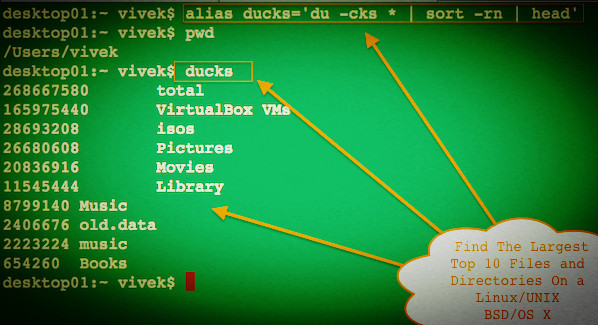
Use the following bash shell alias:
alias ducks='du -cks * | sort -rn | head'Run it as follows to get top 10 files/dirs eating your disk space:
$ ducksSample outputs: